Are You a TIFF Person or a JPG Person? Here's How to Tell
We took a 25.5 KB JPG and converted it to TIFF just to see the number. It came back at 479.49 KB. That's not a typo, it's an 1,780% increase for the exact same image, pixel for pixel identical, just stored differently.
If your reaction to that number is "why would anyone do that on purpose," you're a JPG person, and you probably already know it. If your reaction is "sure, that's what lossless costs," you're a TIFF person, and you also already know it. The honest answer to "TIFF vs JPG" isn't a universal winner, it's a question of which one you actually are, based on what you're doing with the file. Here's how to tell.
You're building a website, an app, or anything meant to load in a browser
You're a JPG person, full stop, and it's not close. We tried dragging a TIFF straight into a browser to see what would happen, and the browser didn't even attempt to display it, it rejected the import outright with an error telling us to try a different file format. No major browser renders TIFF natively, which means a TIFF sitting in an <img> tag on a website simply won't show up for any visitor, on any device. If the destination is a screen loading over the internet, TIFF isn't a worse option, it's not an option.
You're emailing, messaging, or posting a photo somewhere social
Also a JPG person. A 479 KB file is already pushing it for a quick share, and that's from a small test image, real photographs saved as TIFF routinely run into the tens of megabytes. Email attachments have size limits, messaging apps compress or reject large files automatically, and social platforms expect small, web-ready formats as a baseline requirement, not an optimization. None of them are built around a format designed to preserve every byte of the original.
You're sending a file to a print shop for a large-format or gallery-quality print
Now you're a TIFF person. Professional print shops and publishers specifically ask for TIFF, and there's a real technical reason behind the request, not just tradition: TIFF supports 16-bit color depth, capturing far more distinct shades per channel than JPG's 8-bit ceiling, along with native CMYK support, the actual color model commercial printers use. A JPG's compression artifacts, invisible on a screen, can show up as visible banding or softness once an image is blown up to poster size. For anything going to press at real size, TIFF is what the workflow expects, not just what looks nicer on paper.
You're a photographer or editor in the middle of a project, not at the finish line yet
TIFF person, at least for now. The core difference that matters here: TIFF's lossless compression means the file looks bit-for-bit identical no matter how many times you open, edit, and re-save it. JPG's lossy compression degrades a little more with every single re-save, a real, measurable effect called generation loss. If you're going to touch a file five or ten times before it's finished, working in TIFF (or your editor's native format) protects quality through every one of those passes. The moment editing is actually done and the file is heading somewhere final, that's the moment to convert down to JPG, not before.
You're scanning old family photos, documents, or anything you're archiving for the long term
This one's genuinely split, and it's worth being honest about the trade-off instead of picking a side. TIFF is the safer long-term bet: a TIFF saved decades ago opens identically today, with zero degradation, which matters if these files are meant to outlive the current generation of hardware and software. The real cost is storage, TIFF files run roughly ten to twenty times larger than an equivalent JPG. If you're archiving a handful of irreplaceable originals, the extra storage space is a small price for the guarantee. If you're scanning boxes of casual snapshots where a small amount of compression won't be missed, a high-quality JPG at 90%+ quality is a reasonable compromise that won't quietly fill up a hard drive.
The actual test, if you want to see it yourself
Here's the conversion we ran: a 25.5 KB JPG converted to TIFF and came back at 479.49 KB, a 1,780% increase.
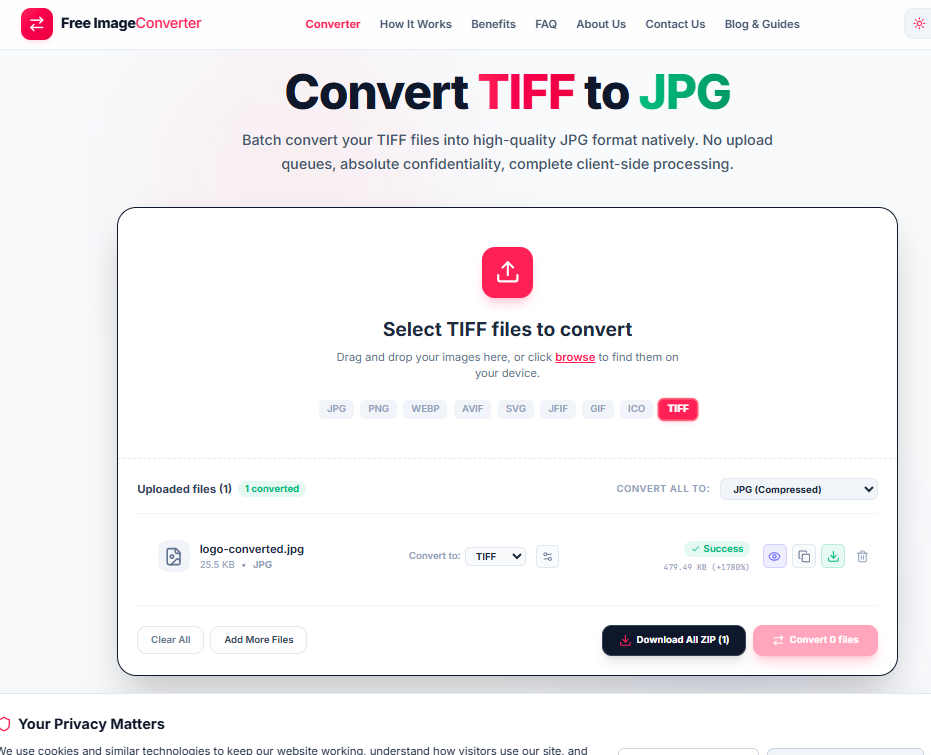
And here's what happened when we tried to open a TIFF file directly in a browser instead of an image editor.
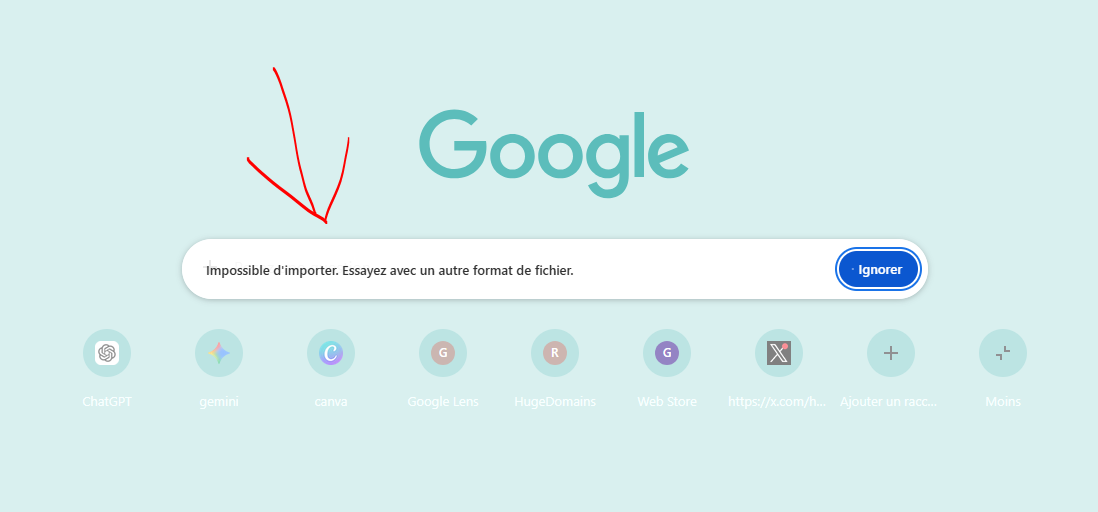
That gap between "gets bigger by a factor of nearly 20" and "won't even open where you need it to" is the entire TIFF vs JPG decision in two screenshots. Neither format is broken. They're built for opposite jobs, and the file that's right for you depends entirely on which job you're actually doing today. You can convert any file between TIFF and JPG with our converter right in your browser.
Convert between TIFF and web formats
Shrink massive TIFF archives into web-ready JPGs or export lossless PNG copies directly in your browser.