Follow One Pixel Block Through JPEG Compression, Start to Finish
Most explanations of image compression describe what it does: makes files smaller, throws away detail you won't miss. Almost none walk through what actually happens, in order, to the numbers inside the file. This one does. Take a single 8×8 block of pixels, the smallest unit JPEG-style compression actually operates on, and follow it through every stage between the original photo and the smaller file that comes out the other side.
Stage zero: what a block actually is before anything happens to it
An image, to a computer, is just a grid of numbers, one brightness value per color channel per pixel. JPEG-style compression doesn't process a whole image at once. It carves the image into tiles 8 pixels wide and 8 pixels tall, 64 pixels per tile, and runs every remaining stage on one tile at a time. A single one of these blocks, before compression touches it, is nothing more than 64 raw numbers sitting in a grid, no different in kind from any other 64 numbers in the file.
Stage one: splitting color so compression can play favorites
Before blocks get carved out, the image is converted from RGB (red, green, blue) into a different representation: one channel for brightness (luma) and two for color (chroma). This isn't cosmetic, it's the first place compression starts making a bet on human perception. The human eye is measurably more sensitive to changes in brightness than to changes in color, so once the image is split this way, the two color channels can often be stored at lower resolution than the brightness channel without a viewer noticing, a technique called chroma subsampling. The brightness channel, where the eye is paying closest attention, stays at full resolution into the next stage.
Stage two: the frequency transform, where pixels stop being pixels
This is the step most explanations skip past, and it's the actual mathematical core of the format. Each 8×8 block gets run through a Discrete Cosine Transform, which doesn't compress anything by itself, it just re-describes the same 64 numbers in a completely different form: not as 64 pixel brightness values, but as 64 coefficients describing how much of each spatial frequency pattern is present in that block. One coefficient represents the average brightness of the whole block. The rest represent increasingly fine patterns of light-to-dark variation, from broad gradients up to the tightest possible checkerboard pattern an 8×8 block can hold.
Nothing has been thrown away yet. This step is fully reversible, mathematically exact, it's just a translation, from "what does each pixel look like" to "how much of each pattern of change is present." That translation is what makes the next step possible.
Stage three: quantization, the step that actually deletes information
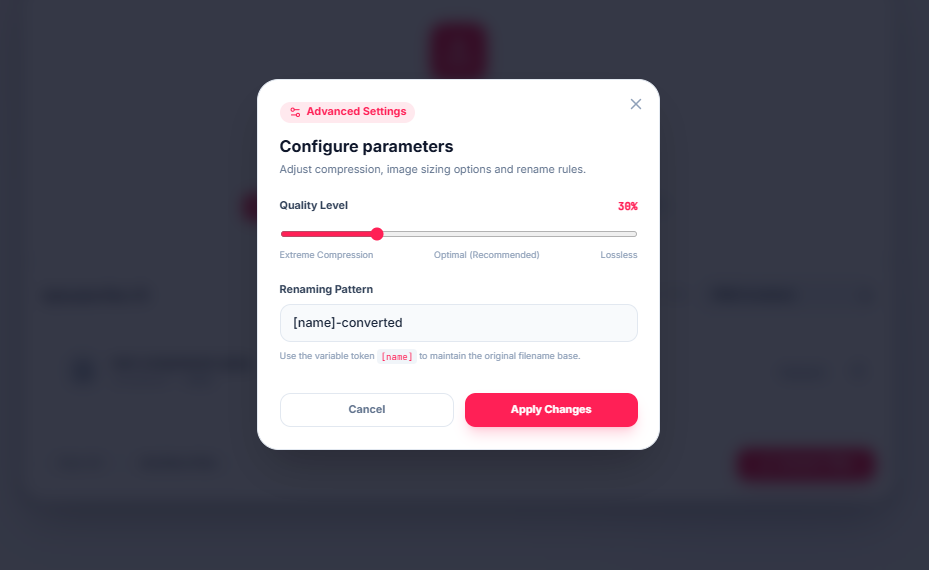
This is where compression stops being reversible, and it's also the step your quality slider is actually controlling. Real-world photographs, once transformed into frequency coefficients, tend to have a very specific shape: a lot of energy in the low-frequency coefficients (broad tones, gradients, the big shapes) and very little in the high-frequency ones (fine texture and noise). Quantization divides every coefficient by a number and rounds the result, and it uses bigger divisors for the high-frequency coefficients specifically, on the logic that human vision is worse at noticing when fine detail goes missing than when broad tonal shifts do.
At a high quality setting, the divisors are small, most coefficients survive rounding relatively intact, and very little detail is actually discarded. At a low quality setting, the divisors are large enough that most of the high-frequency coefficients round all the way down to zero, and once a coefficient becomes zero, the specific fine detail it represented is gone, permanently, there's no reversing this step. This is the exact mechanism behind the "quality" number in every JPEG export dialog: it isn't a vague dial, it's a direct control over how aggressively those divisors round mid- and high-frequency detail away.
What that actually looks like on a real file
We ran a real photo through our converter at 38% quality, deep in the more aggressive end of the range, and zoomed both the original and the result to 300% for a direct look at the same region.
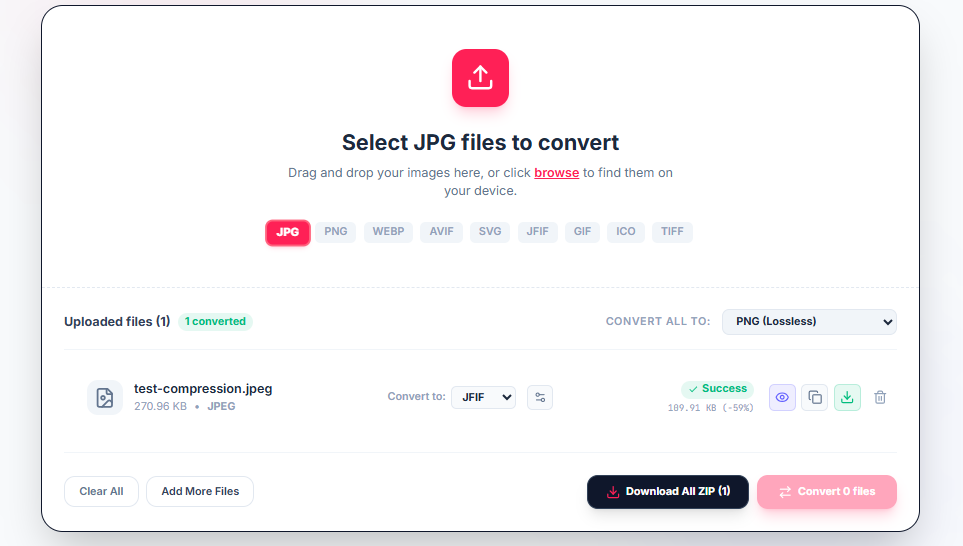


At normal viewing size the two look close to identical. At 300%, the effect of the previous stage becomes visible directly: softened detail in the high-frequency areas, most noticeably in the fine texture, exactly where quantization was instructed to be least forgiving. The file size dropped from 270.96 KB to 189.91 KB, a 59% reduction, and the zoomed comparison is what that percentage actually costs in exchange, information from the high-frequency coefficients that quantization rounded down to nothing.
Stage four: entropy encoding, squeezing the leftovers losslessly
Once quantization has zeroed out a large share of the high-frequency coefficients, especially at low quality settings, the data left behind has a useful property: long runs of zeros and a small set of frequently repeated values. The final stage exploits that directly. Coefficients are reordered in a zigzag pattern that groups similar frequencies together, runs of zeros get compressed with run-length encoding, and the remaining values get assigned shorter binary codes the more often they occur, classic entropy coding, the same family of technique used in general-purpose compression like ZIP.
This stage is completely lossless. Nothing here changes the actual image data, it only changes how efficiently the surviving numbers are packed into bytes. It's also why quantization and entropy encoding are easy to conflate but do fundamentally different jobs: one decides what to throw away, the other losslessly compresses whatever's left after that decision has already been made.
Why this explains a few things that otherwise feel arbitrary
Once you've traced a block through all four stages, a few common observations stop being mysterious. Blockiness at low quality settings shows up specifically as 8×8 squares because that's the literal unit the whole pipeline operates on, artifacts don't blend across block boundaries because each block was transformed and quantized independently of its neighbors. Text and sharp edges degrade faster than smooth photographs at the same quality setting because sharp transitions require exactly the high-frequency coefficients that quantization is most aggressive about discarding. And re-saving a JPEG repeatedly makes it progressively worse because every save re-runs this entire pipeline from scratch on whatever pixels currently exist, compounding a small, real loss each time rather than approaching some stable final state.
This describes JPEG's specific DCT-and-quantization pipeline. Newer formats like WebP and AVIF build on a related but more elaborate set of transforms and prediction techniques, so the exact numbers differ, but the underlying trade nearly all lossy image compression makes, sacrificing the frequency information human vision is worst at noticing, in exchange for smaller files, is the same idea this pipeline was built on decades ago with our converter.
Experiment with compression settings
Convert and compress your JPG, WebP, and PNG images locally with instant visual preview.