We Converted One Image 20 Times. The File Size Chart Lied to Us.
We took a single JPEG, 271 KB, and ran it through 20 consecutive conversions, cycling through every format our converter supports, JPG, PNG, WebP, AVIF, SVG, JFIF, GIF, ICO, TIFF, over and over, feeding each output back in as the next input. The plan was simple: watch the file size after every hop and see what a real conversion chain actually does to an image, rather than assuming.
The file size chart we got back was almost useless on its own. Here's why, and what was actually happening underneath it.
The 20 numbers, in order
| Step | Format | Size |
|---|---|---|
| Start | JPEG | 271 KB |
| 1 | PNG | 2,521 KB |
| 2 | WebP | 253 KB |
| 3 | AVIF | 317 KB |
| 4 | SVG | 423 KB |
| 5 | JFIF | 281 KB |
| 6 | GIF | 577 KB |
| 7 | ICO | 231 KB |
| 8 | TIFF | 257 KB |
| 9 | PNG | 157 KB |
| 10 | JPG | 17 KB |
| 11 | WebP | 15 KB |
| 12 | AVIF | 18 KB |
| 13 | JFIF | 17 KB |
| 14 | GIF | 40 KB |
| 15 | ICO | 189 KB |
| 16 | TIFF | 257 KB |
| 17 | AVIF | 20 KB |
| 18 | PNG | 160 KB |
| 19 | JFIF | 17 KB |
| 20 | JPEG | 17 KB |
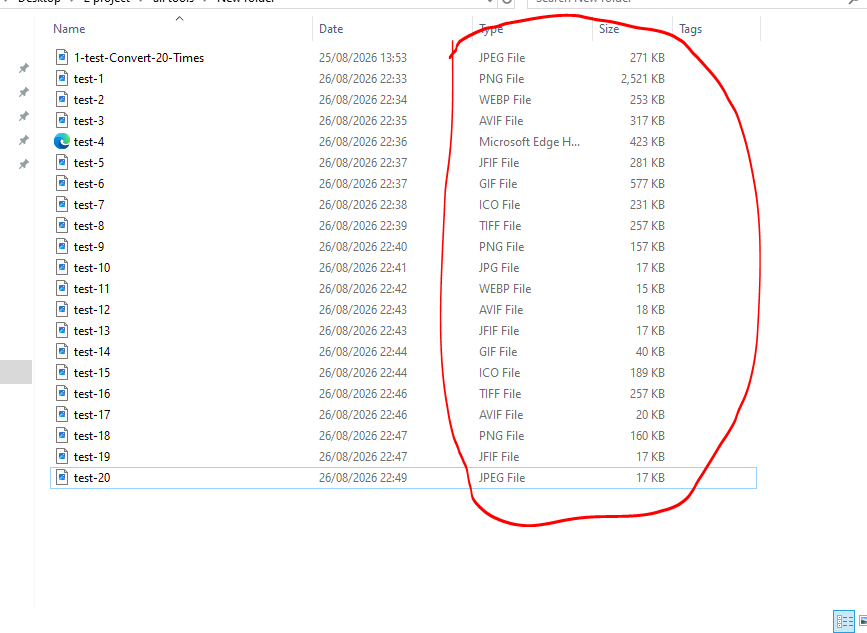
Nothing about that sequence looks like steady decay. It jumps up to 2.5 MB one step in, bounces between 200 and 600 KB for the better part of a dozen steps, then collapses to under 20 KB and stays roughly there. If file size were the only thing being measured, the honest conclusion would be "this is noisy and doesn't mean much." That conclusion would also be wrong, because file size was never the variable that mattered here.
Why the size bounces instead of dropping smoothly
Every format on that list stores an image differently, and that difference alone can swing file size by an order of magnitude with zero change in visual quality. Step 1 is the clearest example: converting a compressed JPEG into lossless PNG doesn't recover any lost detail, it just stores every pixel exactly as the JPEG left it, compression noise included, at full precision. PNG isn't being wasteful there, it's being honest about how much information a lossless format needs to hold something a lossy format had already quietly degraded. The same logic explains the later swings between TIFF, ICO, and the more compact formats: container overhead and encoding strategy differ enough between formats that size alone can't be read as a quality signal from one step to the next.
What the bouncing size was actually hiding
Underneath that noisy chart, something did change steadily, and it wasn't visible in the numbers at all: every single lossy step, every hop through JPEG, WebP, or AVIF, re-compresses whatever pixels currently exist, not the original ones. This is generation loss, a well-documented property of lossy compression: each lossy encode makes its own independent decision about which fine detail to discard, and those decisions stack, because step 15's encoder has no way of knowing which details step 3's encoder already sacrificed. The pixels degrade a little further on every lossy pass, regardless of what the resulting file size happens to do.
Looking at our own result after all 20 steps confirmed this directly. We couldn't quantify the visual loss the way the size numbers are quantified, but it was visible without needing to zoom in, especially once the chain had passed through several different lossy formats rather than staying within one. The image that came out the other side was noticeably softer and less defined than the one that went in, independent of whatever the file size happened to read at that particular step.
The one pattern the noise couldn't hide
Despite the swings, there's a real signal buried in that table if you compare the start to the end rather than step to step: 271 KB down to 17 KB, a 94% reduction, and notably, everything from step 10 onward stays in a much narrower, much smaller band (15 to 257 KB) than everything before it (157 to 2,521 KB). That's consistent with a real floor being hit around the tenth conversion, the point where enough cumulative lossy damage had already happened that later format hops were mostly just re-containering an already-degraded image rather than losing meaningfully more from it. We can't prove that mechanism definitively from file size alone, but the shape of the data lines up with exactly what repeated generation loss predicts: damage that front-loads early and then plateaus once there's not much fine detail left to lose.
What this actually means for a real workflow
The lesson here isn't "avoid converting images," it's "count your lossy hops, not your total conversions." Converting a lossless master to five different lossy formats for five different destinations does no cumulative damage to the master itself, each conversion starts fresh from the same untouched source. What actually causes the damage in a chain like ours is feeding a lossy output back in as the next input, repeatedly, so each step compounds on already-degraded pixels instead of the original ones. If a workflow genuinely needs to pass through several formats, keeping one lossless copy as the permanent source, and always converting outward from that copy rather than from whatever the last conversion produced, avoids the entire problem this test ran into on purpose with our converter.
Convert directly from your lossless masters
Avoid generational loss by converting directly from original source images into WebP, AVIF, PNG, or JPG.