WebP Won't Open, Won't Attach, Won't Print? Here's the Fix for Each
Converting WebP to JPG almost always makes the file bigger, not smaller. We ran it ourselves: a 36.36 KB WebP came back as a 65.61 KB JPG, an 80% increase. If you've landed here expecting a compression guide, this isn't one. Nobody converts WebP to JPG to save space. They do it because something on the other end refuses to open the file at all. Below are the specific places that happens, and the actual fix for each.
Ticket: "Can't attach this file" or the image just won't show up in an email
Symptom: You attach or embed a WebP image in an email and either the send fails, or the recipient opens the message and sees a broken image icon instead of the picture.
Cause: WebP support in email clients is genuinely inconsistent, not just an edge case. Apple Mail and Yahoo Mail render WebP fine. Gmail and Outlook only partially support it, and that support varies further depending on whether someone's using the web client, the desktop app, or an older corporate Exchange setup. There's no single "email supports WebP" answer, it depends on which client is on the receiving end, which you usually don't control.
Fix: Convert to JPG before attaching. JPG has been the email-safe format since before most current email clients existed, and every mail client on earth renders it without exception. This isn't a workaround, it's the reliable option when you can't guarantee what's opening the file on the other side.
Ticket: A print shop or print-on-demand platform rejects the upload
Symptom: You try to upload a WebP design or photo to a print service, merchandise platform, or local print shop's portal, and the upload either fails outright or the file appears greyed out as an unsupported type.
Cause: The print industry has had little reason to adopt a compression format built specifically for web page-loading speed, since file size doesn't matter the same way when a file is moving over a local network or a USB drive instead of loading in someone's browser. Most print-on-demand platforms still don't support WebP natively as a result, and print workflows in general are built around JPEG, TIFF, and PDF.
Fix: Convert to JPG before uploading. It costs you nothing in print quality that WebP was giving you in the first place, since the compression benefit only mattered for web delivery, and it guarantees the platform accepts the file on the first try.
Ticket: An older photo editor or design tool won't open the file
Symptom: You double-click a .webp file expecting it to open in your usual editor, and instead get an "unsupported format" error, or the software simply won't display a preview at all.
Cause: WebP support in desktop creative software arrived years after WebP itself did. Photoshop, for example, didn't add native WebP support until version 23.2, released in February 2022, so any installation older than that, along with a fair number of other design and photo tools, simply predates the format.
Fix: Convert to JPG, which every version of every major photo editor, going back decades, opens without a plugin or an update. If you specifically need to preserve editability without flattening a transparent background, PNG is worth considering instead of JPG for this particular case, but JPG is the safer default when the file is a straightforward photo.
Ticket: A CMS or upload form rejects the file, or scanner/legacy software only outputs older formats
Symptom: A content management system, document management tool, or specialized software (scanning tools, older medical or industrial imaging systems) rejects a WebP upload or simply doesn't offer WebP as an option to begin with.
Cause: A lot of specialized and legacy software was built around a narrow, fixed set of accepted formats, typically JPG, PNG, TIFF, or PDF, and was never updated to recognize newer formats as they emerged. This is common enough in scanning and document workflows, and in industry-specific software, that it's rarely worth troubleshooting the platform itself.
Fix: Convert to JPG. It's the one format from that original fixed set that's virtually guaranteed to be on the accepted list, precisely because it predates almost every piece of software still running these workflows today.
The actual test, for reference
Here's the conversion we ran to check the size trade-off mentioned at the top: a 36.36 KB WebP file converted to JPG came back at 65.61 KB, an 80% size increase for the same image.
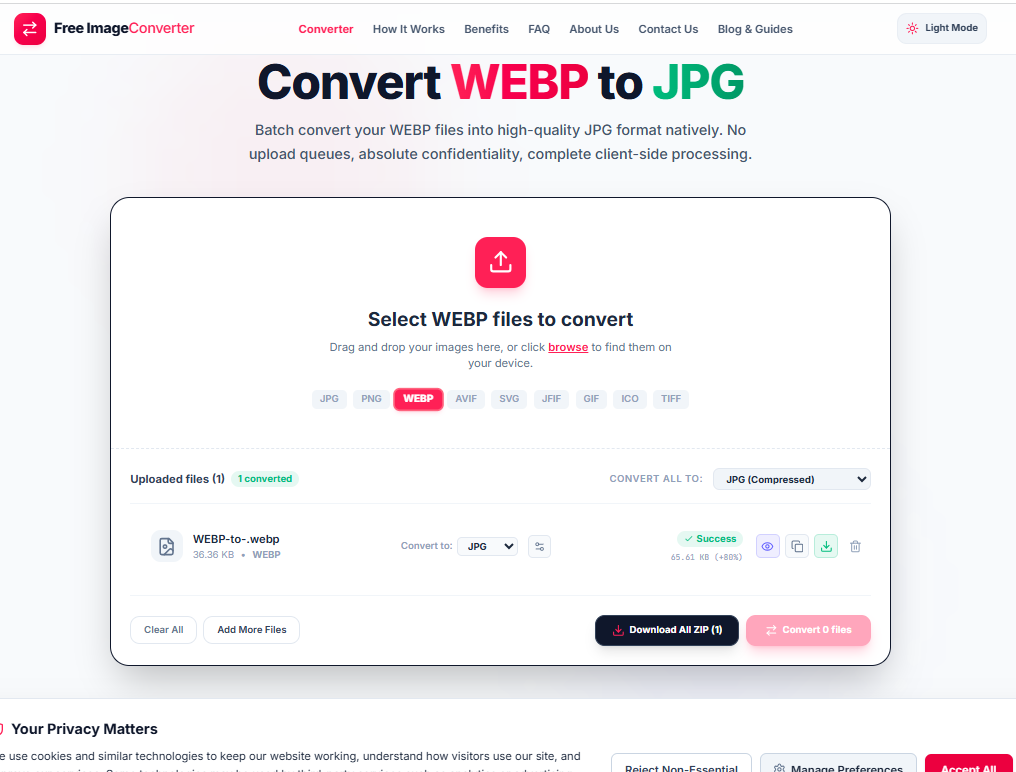
That's the honest cost of solving a compatibility problem this way. You're not getting a smaller file. You're getting a file that opens everywhere the WebP didn't, and for any of the four situations above, that trade is the whole point.
When not to bother
If the WebP is only ever going to live inside a browser, your own website, a modern CMS, a platform you've already confirmed accepts it, converting it to JPG just makes the file bigger for no reason. This is a fix for a specific, verifiable compatibility wall, not a format you should default to out of caution. You can convert any file with our converter right in your browser whenever you hit one of these roadblocks.
Fix WebP compatibility issues instantly
Convert problematic WebP images into universally supported JPG or PNG formats for printing and emailing.