Where Does Your Image Metadata Go When You Convert It?
The information you don't see
Open a phone photo in its native gallery app and it will tell you things the picture itself never shows: the exact model of phone that took it, the aperture and shutter speed, the date down to the minute, sometimes precisely where you were standing. None of that lives in the pixels. It rides alongside them, in a data block most viewers never open. We wanted to know what actually happens to that block the moment a photo gets converted to another format, so instead of describing the theory, we ran one straight through.
The source file, before anything happened to it
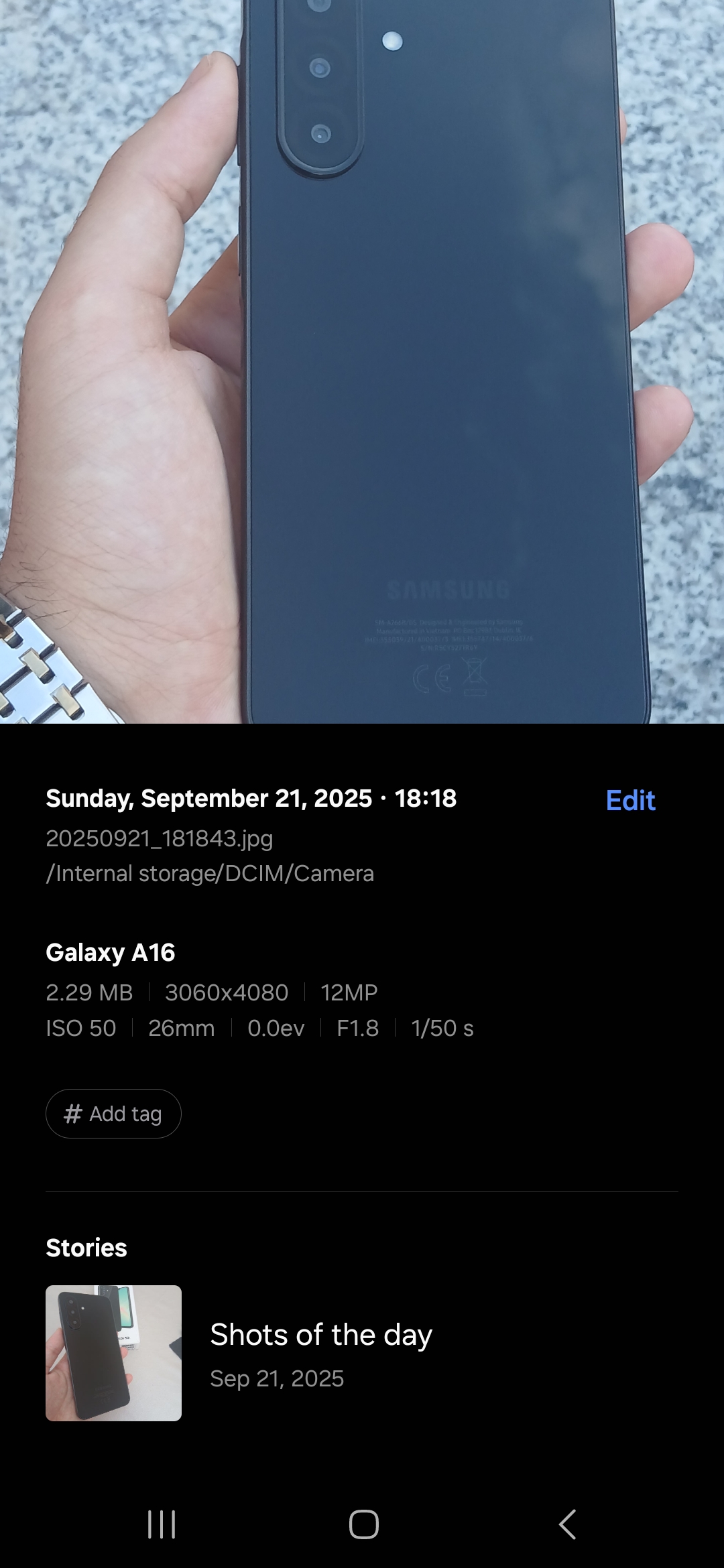
The test image was a real photo, taken on a Samsung Galaxy A16, straight out of the camera with no editing. Before touching a converter, we pulled its properties twice, once from the phone's own gallery app, once from Windows.
The phone reported: Galaxy A16, 3060×4080, 12MP, ISO 50, 26mm focal length, f/1.8 aperture, 1/50s shutter speed, filed under /Internal storage/DCIM/Camera, dated Sunday, September 21, 2025, 18:18.
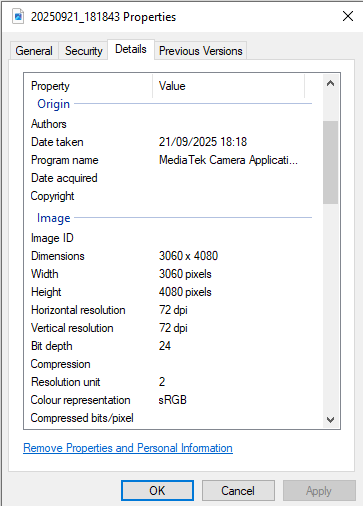
Windows' own Details panel, reading the same file, showed a matching Date Taken (21/09/2025 18:18), a Program name field reading "MediaTek Camera Application," dimensions of 3060×4080, sRGB colour representation, and a 24-bit depth.
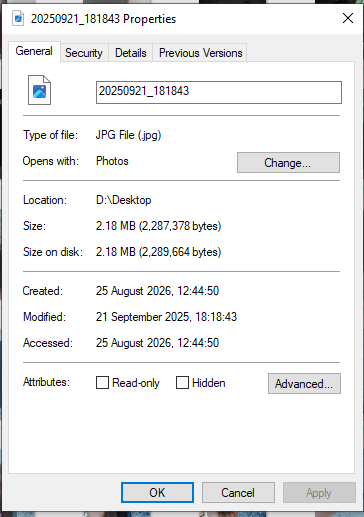
Notably absent from what either view surfaced: GPS coordinates. Not because the format doesn't carry them, but because this particular shot, on this particular phone, either had location tagging off or the field was simply never populated. That's worth flagging up front, because it means this test can confirm what happened to timestamp and camera data with certainty, but can't tell you what happens to GPS data specifically, since there wasn't any here to lose.
What we actually did
We ran that file through our own converter, JPG to AVIF, changed nothing in the settings, and compared the properties of the result against the original.
The file size dropped from 2.18 MB to 314 KB, an 86% reduction, consistent with AVIF's compression efficiency on photographic content.
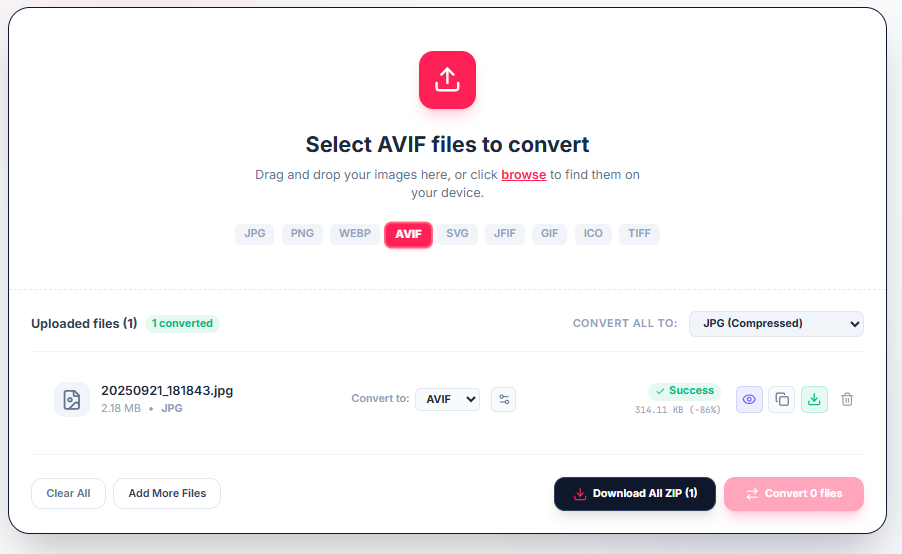
That part was expected. What happened to the metadata was not something we'd assumed either way going in, so we checked directly instead of guessing.
What survived, and what didn't
| Field | Source JPG | Converted AVIF |
|---|---|---|
| Date taken | 21/09/2025 18:18 | Not present |
| Program name | MediaTek Camera Application | Not present |
| Camera maker | (populated on device) | Blank |
| Camera model | Galaxy A16 | Blank |
| F-stop / ISO / exposure | f/1.8, ISO 50, 1/50s | Blank |
| Colour representation | sRGB | Blank |
| Dimensions | 3060×4080 | 3060×4080 (unchanged) |
| Bit depth | 24 | 32 |
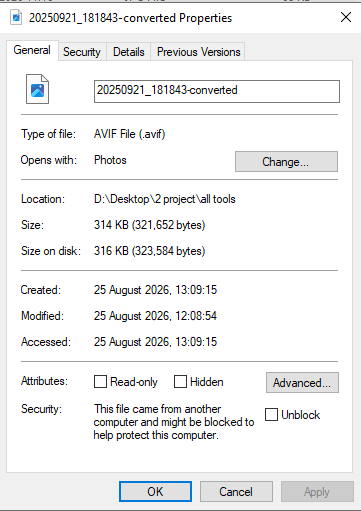
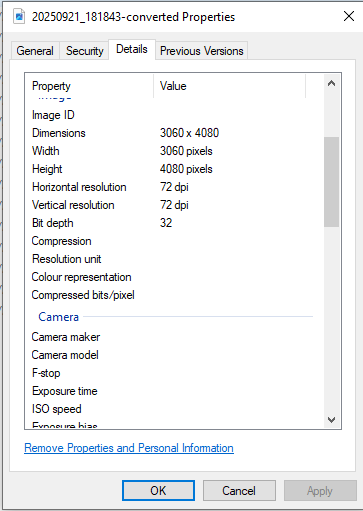
Every field tracing back to the camera or the moment the photo was taken came back either missing entirely or present as an empty label with no value behind it. The Details panel on the converted file still lists "Camera model" and "Exposure time" as fields, but there's nothing next to them. Dimensions survived untouched. Bit depth changed from 24 to 32, which reflects how the AVIF container represents pixel data internally rather than any deliberate addition of color information, not something to read as a quality upgrade.
We looked for a setting that controlled this, since a decision this significant felt like something a tool would surface as a choice. Across every Advanced Settings panel we'd used on this converter for prior tests, quality level and a file renaming pattern were the only options present. Nothing offered a choice to keep or strip metadata. Whatever stripped this data did so as a fixed step in the conversion pipeline, not a setting a user consciously picked.
What this test can't tell you, and what the broader picture looks like
This result is specific to one file, one conversion path, JPG to AVIF, on one tool. It's real, but it's a single data point, not a universal law about AVIF as a format. Independent documentation of format metadata handling backs up why that distinction matters: whether metadata survives a conversion depends heavily on which specific tool and encoder does the converting, not on some fixed rule baked into the destination format. AVIF and WebP are both technically capable of carrying full EXIF, XMP, and ICC data, some encoders preserve it faithfully, others discard it by default to save bytes, and the same source file can come out of two different converters with completely different metadata outcomes despite landing in the same format.
PNG has its own separate wrinkle worth knowing. Camera EXIF data can legally live inside a PNG file, in a dedicated chunk that's been part of the official specification since 2017, but adoption of that chunk by editing software has stayed inconsistent for years, which is part of why PNG has a reputation as the "safer" format for privacy. That reputation is a byproduct of inconsistent tooling, not a guarantee written into the format itself, and treating it as a rule is exactly the kind of assumption that occasionally turns out wrong.
Why this matters beyond curiosity
The fields that vanished in our test, camera model, exposure settings, capture timestamp, aren't especially sensitive on their own. But EXIF blocks in general are built to carry GPS coordinates in the same structure, down to enough decimal precision to identify a specific building, and plenty of phones write that field automatically unless location tagging has been turned off. A photo taken inside a home, at a school pickup, or at a private event can carry that coordinate silently, visible to nobody looking at the image, readable instantly by anyone who knows to check the metadata rather than the picture.
The uncomfortable part isn't that conversion strips data, stripping is often the safer outcome. It's that whether it happens at all is invisible and inconsistent from the outside. Nothing in a typical converter's interface tells you, before or after, whether the file you're about to download still carries the coordinates of wherever you were standing when you took it.
What to actually check, rather than assume
Don't trust a format name as a privacy guarantee in either direction, "AVIF strips things" and "JPEG keeps everything" are both oversimplifications this test alone should discourage. The only way to know what a specific image actually carries is to look. On Windows, the Details tab in a file's Properties dialog shows most of what matters, including a direct "Remove Properties and Personal Information" link if you want it gone deliberately rather than by accident. On a phone, the native gallery's info or details view, the same screen that showed ISO and focal length in our test, will usually surface GPS data if it's present. If a conversion tool doesn't tell you one way or the other, the safest assumption is to check the output file yourself rather than trust that a format change handled it for you.
The practical takeaway
In this test, converting to AVIF quietly removed the camera and timestamp data along with the file size. That's a reasonable outcome for most people sharing a photo online, and arguably a better default than the alternative. But it happened without being asked, without a setting to confirm it, and without anything in the interface saying so either way. If metadata removal matters to you, whether you want it gone or you specifically need it to survive, for copyright, for a workflow that depends on capture data, that's not something to assume about any converter. Check the file that comes out, not just the one that went in with our converter.
Convert images with client-side privacy
Optimize files and convert formats 100% locally on your device without uploading anything to remote servers.