GIF to WEBP: What Happens to the Animation
WEBP technically supports animation. That's a fair assumption to walk in with: if the destination format can handle motion, converting an animated GIF to WEBP should just... keep it moving. We tested this directly to check, rather than assume.
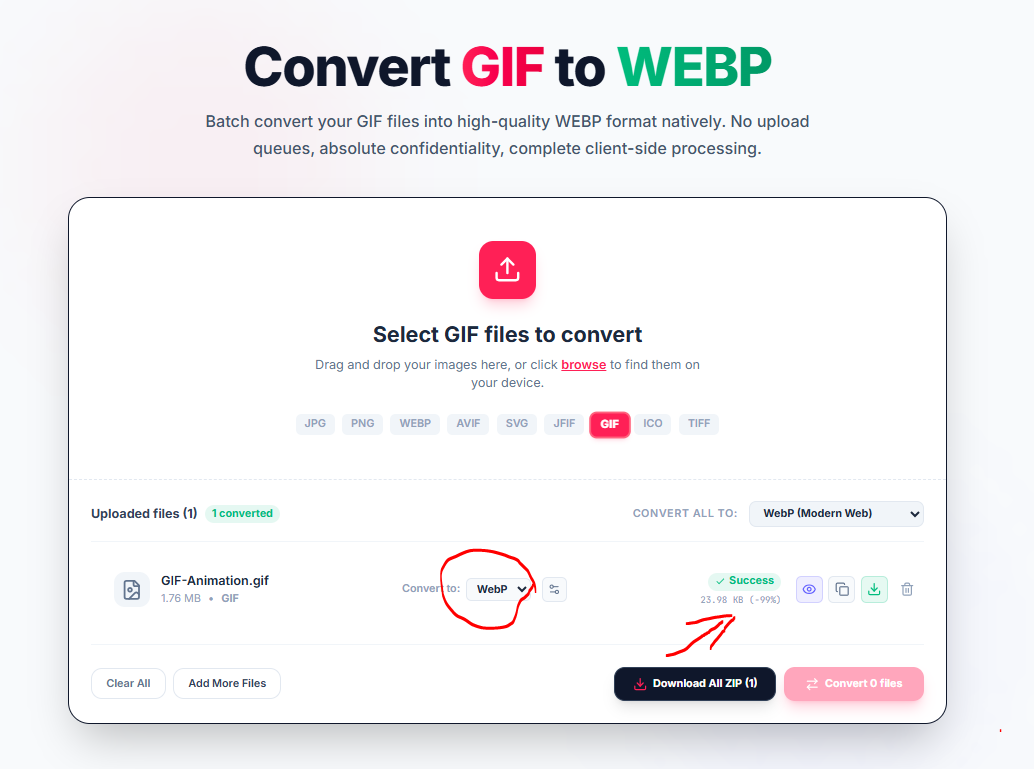
It doesn't. We ran a 1.76 MB animated GIF through the converter set to WebP, and the file that came out was a single still frame, not a moving one. Functionally, the animation stops the same way it would converting to PNG.
Where the Size Reduction Really Comes From
Here's the number that comes with that: 1.76 MB down to 23.98 KB, a 99% reduction. That's a dramatic drop, but it's worth being precise about where it actually comes from. A big part of that number is simply arithmetic: an animated GIF is dozens of individual frames stitched together, and the output is one of them. Comparing a full animation's total weight to a single extracted frame will always look like a massive size cut, regardless of how efficient the destination format is. Some of that reduction is genuinely down to WebP's compression being better than GIF's aging LZW approach even frame-for-frame, but the frame count is doing most of the heavy lifting in a number that large.
When to Use This Conversion
What this means practically: this conversion is a good fit if you want a static thumbnail, preview image, or cover frame pulled out of an animated GIF, not a fit if the whole point was keeping the motion. If the animation itself needs to survive the trip, this tool's GIF to WebP path isn't the one to reach for, and it's worth checking specifically for an "animated WebP" export option elsewhere rather than assuming any GIF-to-WebP converter preserves motion by default.
WebP isn't the only place this same file can go, either. The same conversion queue lets you pick a different destination from the dropdown next to your file, JPG, PNG, AVIF, SVG, JFIF, another GIF, ICO, or TIFF, if a static frame in a different format turns out to be the more useful output for whatever you're actually building.
Try the GIF to WebP converter when a still frame is genuinely what you're after.
Static Frame Extraction
Standard client-side Canvas pipelines extract the primary frame from multi-frame animated GIFs, creating an ultra-lightweight static WebP image.
Key Takeaways
- Thumbnail Extraction: Ideal for generating lightweight preview posters and static placeholders.
- Modern WebP Compression: Far superior frame-level byte efficiency compared to legacy GIF 256-color palettes.
- Multi-Format Output: Convert static frames freely to JPG, PNG, AVIF, TIFF, or ICO in the same queue.
Format Flexibility
Need a PNG with transparency or a JPG for wider compatibility instead? Switch destination formats at any time right from the converter dropdown.
GIF processing occurs entirely on your device via HTML5 Canvas. Your files are never uploaded to any remote server or cloud service.